
MAM, Data Containerisation vs MDM
2 Core Strategies Used to Secure Corporate Data on Mobile Devices

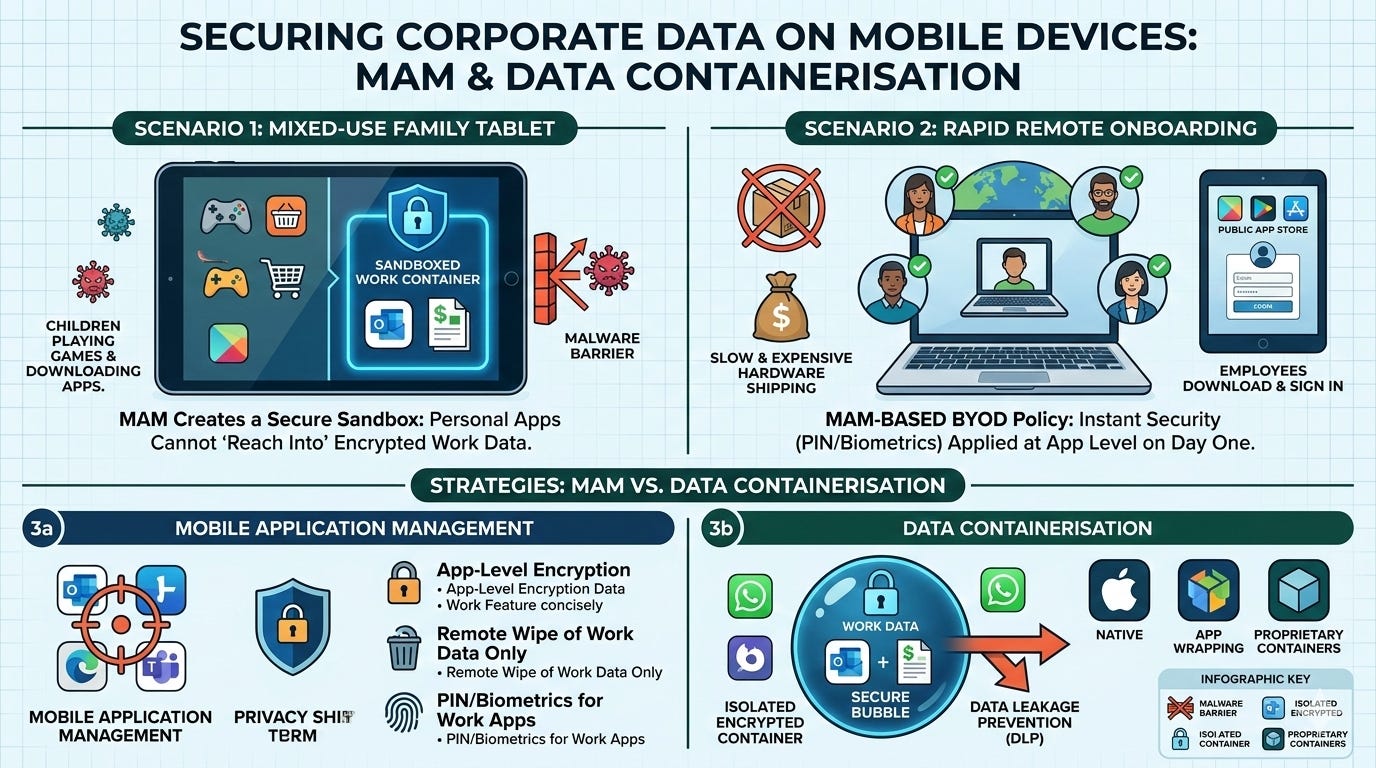
Scenario: An executive uses their personal iPad to review financial reports, but their children also use the tablet to play games and download new apps that might contain malware.
The MAM Need: Instead of locking down the entire family tablet with restrictive MDM profiles (which would frustrate the family), MAM creates a sandboxed environment. Even if a malicious app is downloaded on the personal side of the device, it cannot "reach into" the encrypted work container to steal financial data.
Scenario: A startup scales quickly, hiring 20 remote employees across different countries in one week. Shipping company-owned MDM-managed devices globally is too slow and expensive.
The MAM Need: The company implements a BYOD (Bring Your Own Device) policy using MAM. Employees simply download approved apps from a public app store and sign in. Security policies (like requiring a PIN or biometrics for work apps) are applied instantly at the app level, allowing the team to be productive on day one without the hardware overhead.
What are the Strategies Used to Security Corporate Data on Mobile Devices?
In the context of enterprise mobility, Mobile Application Management (MAM) and Data Containerisation are two core strategies used to secure corporate data on mobile devices, especially in Bring Your Own Device (BYOD) environments.
Mobile Application Management
MAM is a software solution used to manage and protect specific mobile applications and the business data within them, rather than the entire device.
Targeted Control: Unlike Mobile Device Management (MDM), which controls the whole phone, MAM only applies policies to enterprise-approved apps (e.g., Microsoft Outlook or Teams).
Privacy-First: It is ideal for BYOD because it leaves personal photos, apps, and files untouched, making it less intrusive for employees.
Key Features: Includes app-level encryption, remote wiping of only corporate data (selective wipe), and requiring a separate PIN or biometrics to access work apps.
Data Containerisation
Containerisation (or “sandboxing”) is the technical method used by MAM to isolate work data from personal data on the same device.
The “Secure Bubble”: It creates an encrypted, separate environment—a digital container—where all corporate applications and data reside.
Data Leakage Prevention (DLP): Policies within the container prevent sensitive information from moving to unmanaged apps. For example, it can block users from copying text from a work email and pasting it into a personal messaging app like WhatsApp.
Types of Containerisation:
Native Containerisation: Built directly into the OS by Apple (iOS) or Google (Android Enterprise/Work Profile), offering high security and a seamless user experience.
App Wrapping: A technique that adds a security layer to an existing app without changing its source code, often used when native OS support is unavailable.
Proprietary Containers: Third-party “workspace” apps that act as a single secure portal for all work-related tasks.
Leading Solutions
Many organizations use Unified Endpoint Management (UEM) platforms to combine these features.
Microsoft Intune: A widely used solution that provides robust MAM and containerisation through “App Protection Policies”.
VMware Workspace ONE: Offers comprehensive application management and secure containerised workspaces.
Citrix Endpoint Management: Focuses on secure app delivery and granular data control.